


Tonk 12: Tunk Rummy ZingPlay
4.4953.00 Reviews
App Specs
- Version
- 1.10
- Updated On
- License
- Free
- Downloads
- 100,000+
- Developer
- VNG ZingPlay Studio
- Categories
- Card
- Platform
- Android
Screenshots


 Analysis by AppCompare
I like card games most when the decisions stay interesting but getting to a hand doesn’t take a lot of setup. Tonk 12: Tunk Rummy ZingPlay aims for that quick-play appeal, bringing a Tonk-style experience to a phone. Its focus on drawing, discarding and judging when to push your luck gives each round a clear rhythm, although that pace may not suit everyone. I’d especially consider it if you already enjoy rummy-family games and want a way to play without arranging a physical deck.
Who will enjoy this card-table format
This is a better fit for someone who likes paying attention to a hand and adapting as cards move than for a player looking for a quiet, purely solitary puzzle. The online competition is part of its appeal: other people make the table feel less predictable, and you have to make choices with limited time and information. If you prefer to play entirely at your own pace, a solo card game may be a more comfortable alternative.
A typical use might be a short break when you have enough time to focus on a round but not enough to set up a game with friends. I’d avoid starting when I need to respond to messages or leave at a specific moment, since a multiplayer hand asks me to stay attentive. That distinction matters more than whether the game looks casual: a light visual style doesn’t necessarily mean every session can be paused without consequence.
Readable cards, busy decisions
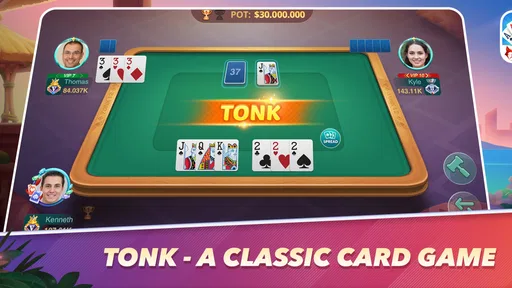
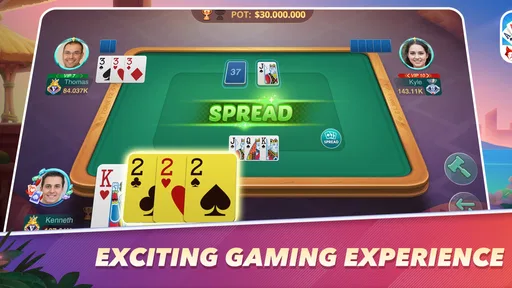
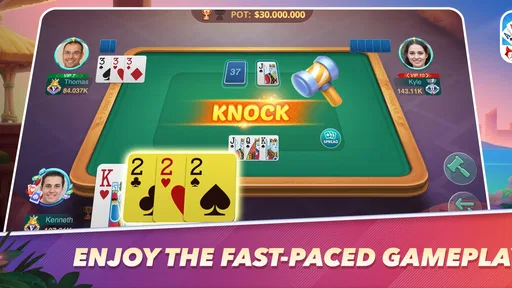
Visual clarity is especially important in a card game, where a small misread can change a decision. The original experience presents its cards in a bright, legible style, and the animations add movement without taking over the table. That helps me scan my hand rather than spending every turn deciphering the screen. Still, readability depends on the individual device and the player; anyone who struggles with small on-screen details should try a few hands before settling in for a longer session.
There is a useful difference between a screen that looks clean and one that is easy for every player to use. Contrast, text size, glare and visual fatigue can all change how comfortable a hand feels. I would play in a well-lit setting, keep the phone at a comfortable distance and pause if I found myself repeatedly checking the same cards. Those are practical habits, not guarantees that the interface will work equally well for every vision need.
Touch, sound and attention
Card play depends on deliberate taps and quick recognition, so the interaction may be less comfortable for someone with limited dexterity or difficulty making precise touch selections. I’d take a low-pressure first session to learn where the main actions sit and whether the pace feels manageable. If a mistaken tap would be frustrating, it is worth checking how the game responds before committing to a higher-stakes round.
The sound and animation give the table some atmosphere, but they are not essential to understanding the basic card decisions. That makes a quiet setting or muted play a sensible option when audio would be distracting. On the other hand, players who rely on sound cues should judge for themselves whether the visual presentation is enough to follow each moment. Sensory preferences vary, so the best setup is the one that keeps the cards comfortable to watch and the table easy to concentrate on.
Worth Reading Before You Choose

EA SPORTS FC Mobile 26 Is a Bigger Football Game, but It Takes Time

Flipboard Shows What News Apps Must Do Beyond the Feed

Switching to Android Auto Means Rethinking Your Driving Routine

Google Calendar Makes a Crowded Week Easier to Manage

Ludo King Makes the Most of the Minutes Between Plans

Baby Panda World Brings Quick Play to Modern Phones, but Its Game Library Feels Busy
A Fresh Take on Classic Card Games
So, what's the deal with Tonk 12: Tunk Rummy ZingPlay? At its core, it's a blend of classic card games like Rummy and Tonk, but with unique features that make it stand out. The gameplay is intuitive and perfect for both newcomers and seasoned card sharks. The app is available on both Android and iOS, so you're covered no matter your device preference.
Gameplay Mechanics
The game starts off by pairing you with players from around the globe, which is a fantastic way to test your skills. The interface is sleek and user-friendly, ensuring you don't get bogged down in endless menus. It's all about fast-paced action here. You play against three other opponents, and the goal is to strategically discard and draw cards to get the lowest score possible. Sounds easy, right? Well, the game's strategic depth quickly becomes apparent as you play.
One of my favorite features is the real-time multiplayer mode. It really adds an adrenaline rush, especially when you’re just a card away from winning. Plus, there's a chat feature, so you can exchange friendly banter or poker faces with your opponents.
Graphics and Sound
Okay, let's talk aesthetics. The graphics in Tonk 12 are crisp and vibrant, making for a visually pleasing experience. The developers have done a stellar job of ensuring that the card designs are clear and easy to read, even on smaller screens. The animations are smooth, adding a bit of flair without being distracting.
And the sound? It's subtle but effective. The background music is catchy enough to keep you engaged without becoming repetitive. The sound effects, like the shuffle of cards or the "ding" when you make a great move, add a layer of immersion that I didn’t know I needed.
Making each round easier to follow
In a fast hand, I find it helpful to slow my own decision-making even when the table itself moves quickly. Before acting, I take a brief look at what I’m holding, what I’m willing to discard and how that choice fits the score goal. This small pause is useful for beginners because it turns a string of taps into a repeatable routine. It can also reduce the chance of reacting to a flashy animation instead of the cards that matter.
For anyone learning Tonk through this app, I’d treat early rounds as practice rather than proof of skill. Online opponents can make the pace feel demanding, and one unfamiliar rule or rushed choice can affect the outcome. A better approach is to play a few low-pressure hands, notice which decisions keep causing uncertainty, then focus on those the next time. That is more useful than trying to memorize every possibility at once.
In-App Features
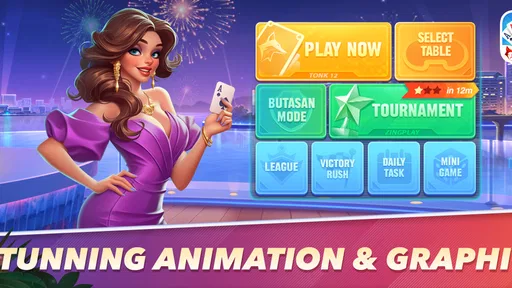
Now, let's dive into the extras. The app offers a series of challenges and tournaments that keep things interesting. As you progress, you earn coins and other rewards, which you can use to unlock special features or enter higher-stakes games. It's a nice touch that keeps you coming back for more.
For those who love customization, the app allows you to personalize your gaming experience. You can choose from a variety of card decks and table themes, which adds a personal touch to your gameplay.
Keeping the game comfortable and in perspective
Challenges and tournaments can be motivating, but I’d treat them as optional structure rather than a reason to play longer than intended. A useful personal rule is to decide before opening the app whether I have time for one hand or a longer session, then stop when that window is over. This is especially sensible if competition tends to make you chase a win after a frustrating round.
The reward loop is another trade-off to keep in mind. Coins can support access to game options, while the presence of higher-stakes play may make the experience feel more competitive than a relaxed kitchen-table game. I would not spend simply to recover from a loss or keep up with other players; the free entry point is enough to see whether the basic rhythm suits you. Optional purchases range from $0.99 to $199.99 per item, so it is worth checking the purchase choices carefully and setting a limit if you share a device or payment method.
Learning Curve
If you're new to Tonk or Rummy, fear not! The app includes a helpful tutorial that guides you through the basics. It's straightforward and interactive, ensuring you get the hang of things quickly. I found it incredibly useful, especially when I was just starting out.
How it compares with other card games
Compared with a solo solitaire-style game, this experience puts more weight on reading a changing table and responding to opponents. Compared with a physical deck, it removes setup and makes it easier to find a game, but it also replaces face-to-face timing with a screen and online interaction. That is a meaningful difference: people who enjoy reading expressions or chatting with friends in the same room may prefer a traditional deck, while players who want a ready-to-play multiplayer table may value the app’s convenience.
It is also not the right choice for someone who wants an elaborate strategy game with long planning phases. The appeal here is a brisk hand and straightforward card decisions, not a sprawling campaign. If you are still learning the rules, the tutorial gives you a starting point, but it does not remove the need to practice judgement against other players. I’d choose it for quick competitive rounds, and choose a slower, solo alternative when I want to pause frequently or think without a table waiting.
Learning Curve
If you're new to Tonk or Rummy, fear not! The app includes a helpful tutorial that guides you through the basics. It's straightforward and interactive, ensuring you get the hang of things quickly. I found it incredibly useful, especially when I was just starting out.
Device fit and practical access
The game is listed for Android and iOS, and its current version is 1.9; Android support starts at version 8.0. I’d check that your device meets that requirement before downloading, particularly if you are using an older phone. The game is free to start, which makes a short trial an easy way to assess whether the pace, card presentation and online format work for you. It is rated Teen, so it is not something I’d assume is suitable for every child simply because it uses cards.
VNG ZingPlay Studio is the developer, and the game has a 4.4 average from around 3,400 ratings, with over 100,000 installs. Those figures suggest that it has found an audience, but they cannot tell me whether the controls or presentation suit a particular player. I’d use the first session to judge that directly: can you comfortably read your hand, make the needed selections and keep track of the round without strain?
Why You Should Try It
"Tonk 12: Tunk Rummy ZingPlay is more than just a card game; it's a community of card enthusiasts from around the world."
Whether you’re looking for a quick game during your coffee break or an intense card battle, this app has got you covered. The community aspect, combined with the strategic gameplay, makes it a must-try for any card game aficionado.
A grounded recommendation
For me, the strongest reason to try it is the combination of familiar rummy-style decisions and opponents who keep each round from feeling entirely routine. The clearest reason to skip it is also tied to that format: if you need a game that can always stop instantly, avoid online competition, or offer a fully self-paced experience, a solo card app is likely a better match.
Released on December 2, 2024, this card game is aimed at Teen players and is free to download. That makes it easy to explore without paying upfront, but the optional purchases and competitive structure deserve a little restraint. I’d recommend trying a few rounds, using the tutorial if the rules are new, and deciding based on comfort as much as on whether you win. A game that feels readable and manageable is more enjoyable than one that simply looks lively.
In conclusion, if you're after a card game app that's both challenging and immensely fun, give Tonk 12: Tunk Rummy ZingPlay a whirl. It’s free to download, so there's really nothing to lose—except maybe a couple of hours as you get hooked!
Pros
- Engaging multiplayer experience.
- Smooth and intuitive interface.
- Quick matchmaking system.
- Free daily rewards and bonuses.
- Variety of game modes available.
Cons
- Requires constant internet connection.
- Occasional in-app purchase prompts.
- Limited offline play options.
- Some ads between games.
- May drain battery quickly.
FAQs for Tonk 12: Tunk Rummy ZingPlay
What is Tonk 12: Tunk Rummy ZingPlay?
Tonk 12: Tunk Rummy ZingPlay is a fast-paced card game available on Android and iOS. It combines elements of Rummy and Tonk, offering an engaging multiplayer experience. The game focuses on strategy and quick thinking, allowing players to enjoy competitive matches with friends or random opponents online.
What are the main features of Tonk 12?
Tonk 12 features an intuitive interface, real-time multiplayer mode, and customizable avatars. Players can join tournaments, earn rewards, and climb the leaderboard. The game also offers in-app purchases for enhancing gameplay or customizing the user experience, making it appealing for both casual and competitive gamers.
Is Tonk 12 free to play, and does it include in-app purchases?
Yes, Tonk 12 is free to download and play. However, it includes optional in-app purchases that allow players to buy coins or special items. These purchases can enhance the gaming experience but are not mandatory for enjoying the core features of the game.
What are the system requirements for Tonk 12?
Tonk 12 requires Android version 4.4 or higher and iOS 9.0 or later. It's optimized for both smartphones and tablets, ensuring smooth gameplay across devices. A stable internet connection is recommended for the best multiplayer experience. Users should ensure sufficient storage space for installation.
How can I contact support if I encounter issues with the game?
If you experience any issues with Tonk 12, you can contact the support team through the app’s settings menu. There, you'll find a help section with FAQs, or you can submit a query directly. Additionally, the official website provides contact information for further assistance.


